To see which road is causing the congestion, click the four square icon and select traffic (yellow box in image A). You can see the road in green, yellow, orange, and red colors. Need to watch the red for heavy traffic and green for light traffic (image B).
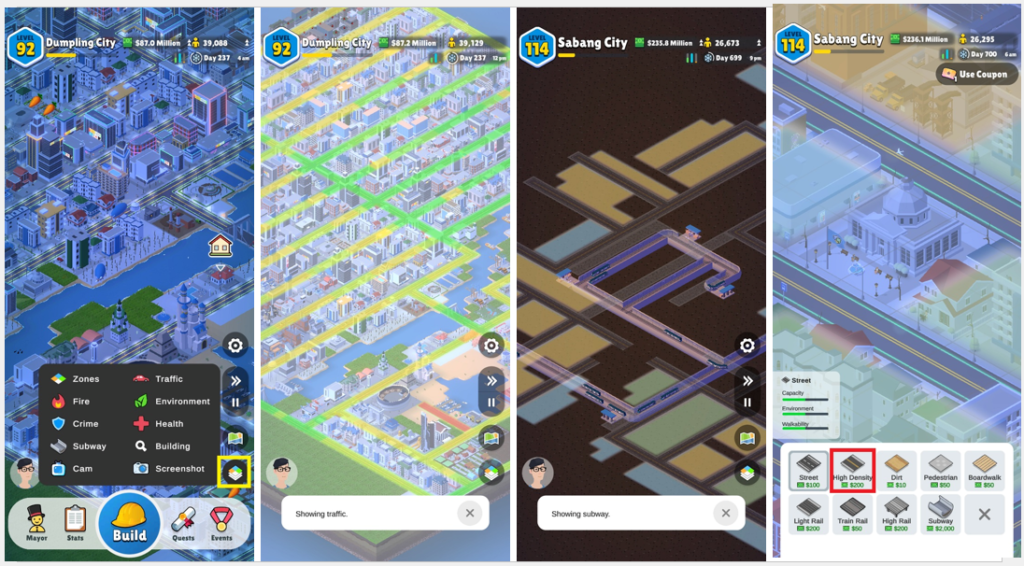
Image A / Image B / Image C / Image D
You can try the Bus Stops in every red spot in the early games. You could also try the traffic light for the combination. This will reduce the traffic congestion. Remember to build a Bus depot before deploying any Bus Stop.
Another way to increase traffic efficiency is to build a few Parking Garage buildings near the red area. For the alternative, try the Light Rail Stop or High Rail Station after a level-up.
You can easily apply the High-Density road with lots of spare money! This is the fastest way to change your traffic congestion to green (Image D).
After a higher level, you can gain Subway Station. This building also helps you to increase traffic efficiency. To build this is a bit hard because the density of your city makes it challenging to select which spot to begin and where to close the loop. Indeed, you will demolish a few buildings to make it right (image C). I mainly apply this in recreation areas with many visiting tourists. To see the result, click the four square icon and select Subway.
Hint!
Try to build your city by dividing the area. For example, not to mix residential areas with industrial areas and so on. Try to construct a mega project area far from the city.
More Hint!
If you want to win the Minigames in Rideshare Driver easily, play it early in the games when the road still has no branches. Yes, only one main street. This will readily win it. If you play this later, it will be hard to win it.